
Download GoPro Player – Free, Secure Video Playback for Mac, Linux & Windows
Overview
GoPro Player is a lightweight, free video player designed specifically for GoPro footage. Available for macOS, Linux and, through community‑built ports, Windows, the player lets you drag‑and‑drop your HERO recordings, preview them in real time, and quickly assess framing, exposure, and motion before committing to a full edit. While GoPro’s own Studio suite focuses on post‑production, GoPro Player fills the niche of a fast, secure playback tool that respects the original file integrity. Because it’s built on open‑source libraries, the app can handle the H.264 and H.265 codecs that modern GoPro cameras use, and it offers basic playback controls such as frame‑by‑frame navigation, speed adjustment, and loop mode. The program does not embed ads, nor does it require a license key, making it an ideal first‑stop for anyone who wants to verify footage on a laptop or desktop without the overhead of a full‑featured editor. In addition, GoPro Player integrates seamlessly with popular conversion utilities, allowing you to export clips to MP4, MOV, or even GIF formats with a single click. Whether you’re a casual adventurer reviewing a weekend surf session or a professional filmmaker checking 4K footage on the fly, GoPro Player provides a secure, no‑frills environment that keeps your video files untouched while you decide the next steps in your workflow.
Key Features of GoPro Player
- Native GoPro codec support – Plays H.264, H.265, and ProRes files without conversion.
- Cross‑platform availability – Official builds for macOS 10.13+ and major Linux distributions; community ports for Windows.
- Drag‑and‑drop interface – Open files instantly by dropping them onto the player window.
- Frame‑accurate navigation – Step forward or backward one frame at a time for precise inspection.
- Variable playback speed – Slow‑motion or fast‑forward playback to analyze motion dynamics.
- Loop and repeat mode – Perfect for reviewing action repeats or creating quick previews.
- Integrated conversion shortcuts – Export to MP4, MOV, or GIF using external tools launched from the UI.
- Lightweight footprint – Consumes under 150 MB RAM, ideal for older laptops and netbooks.
- Secure, ad‑free experience – No telemetry, no ads, and no hidden fees.
- Open‑source under MIT license – Community contributions keep the player up‑to‑date with the latest GoPro firmware.
These features collectively make GoPro Player a practical companion for anyone who captures footage with a GoPro HERO series camera. The emphasis on speed, simplicity, and codec fidelity means you can trust the player to show exactly what was recorded, without any color grading or compression artifacts introduced by the playback software itself. For users who frequently switch between 1080p, 2.7K, and 4K resolutions, the player automatically detects the source resolution and scales the preview window accordingly, preserving the original aspect ratio. Moreover, the built‑in support for external conversion scripts means you can set up a one‑click workflow that sends a selected clip to HandBrake, FFmpeg, or any other CLI converter you prefer, eliminating the need to leave the player environment. This tight integration saves time, especially when dealing with large batches of GoPro files after a multi‑day adventure.
Installation, Usage & Compatibility
Installing GoPro Player is straightforward across all supported platforms. On macOS, simply download the .dmg file from the official GitHub releases page, open it, and drag the GoPro Player icon into your Applications folder. The installer is notarized by Apple, guaranteeing a secure, malware‑free installation. Linux users can obtain a pre‑compiled .deb or .rpm package, or compile from source using the provided Makefile. The package manager will automatically resolve dependencies such as ffmpeg libraries and Qt5 components. Windows enthusiasts can rely on community‑maintained builds available via the “GoPro Player for Windows” repository; these builds are packaged as a portable .zip that requires no installer—just extract and run.
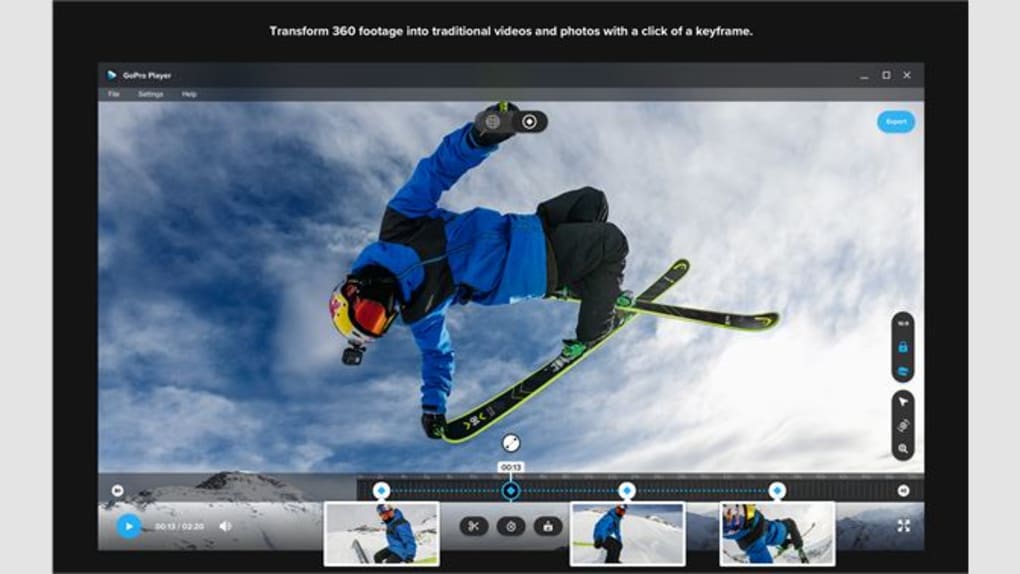
Once installed, launching the player presents a clean, minimalist window with a large preview pane and a toolbar at the top. To open a video, either click the “Open” button or drag the file directly onto the window. The player instantly reads the file header, displays resolution, frame rate, and codec information in a tooltip, and starts playback. Playback controls are intuitive: a single click pauses, the left/right arrows step frames, and the “Speed” dropdown offers 0.5×, 1×, 2×, and 4× options. For looping, toggle the circular arrow icon; the clip will repeat automatically, which is handy for reviewing tricks or stunts. If you need to extract a short segment, use the “Mark In/Out” buttons to define a range and then click “Export Clip.” The export dialog lets you choose the destination folder and file format; the player hands the request off to the configured external converter (default is FFmpeg), preserving original quality unless you specify otherwise.
System requirements:
• macOS 10.13 or later (64‑bit)
• Linux kernel 4.4+ with GLIBC 2.17+ (Ubuntu 18.04+, Fedora 30+, Debian 10+)
• Windows 10 (64‑bit) – community build only
• Minimum 2 GB RAM, 200 MB free disk space for installation
• GPU supporting OpenGL 3.2 or higher for smooth 4K playback
If your hardware falls short of the 4K playback threshold, the player will automatically downscale the preview to 1080p while preserving the original file. This ensures you can still view the content without stuttering, albeit at a reduced visual fidelity. Users with older GPUs may experience occasional frame drops on high‑bitrate 4K footage; in those cases, consider enabling the “Low‑Power Mode” in the Settings menu, which forces software decoding to reduce GPU load. Overall, GoPro Player balances performance and compatibility, making it a reliable tool for both modern workstations and modest laptops.
Pros and Cons
Pros
- Free and open‑source – no hidden costs or licensing headaches.
- Native support for GoPro’s newest codecs, including H.265 4K.
- Lightweight UI that launches instantly, even on older hardware.
- Cross‑platform availability ensures you can use the same tool on Mac, Linux, and Windows.
- Built‑in conversion shortcuts simplify workflow with external tools.
- Secure, ad‑free experience with no telemetry.
- Active community keeps the player up‑to‑date with the latest GoPro firmware changes.
Cons
- No built‑in editing features beyond basic trimming.
- Windows support relies on community builds, which may lag behind official releases.
- Advanced color‑grading or stabilization tools are absent – you’ll need a separate editor.
- Limited subtitle support; not ideal for multilingual projects.
- Occasional GPU driver incompatibilities on very old graphics cards when playing 4K.
Overall rating: 4 out of 5 stars. GoPro Player shines as a dedicated playback solution for GoPro creators, offering speed and simplicity without the bloat of full‑featured editors. Its main limitation is the lack of in‑app editing, but for users who need a quick way to verify footage before moving to a more robust suite, it delivers exactly what it promises.
FAQ
Is GoPro Player truly free or does it have hidden charges?
GoPro Player is 100 % free. It is released under the MIT license, so there are no subscription fees, in‑app purchases, or hidden telemetry.
Can I play 4K GoPro HERO10 footage without lag?
If your system meets the minimum GPU requirements (OpenGL 3.2+ and a modern graphics card), GoPro Player will handle 4K H.265 playback smoothly. On older hardware, enabling Low‑Power Mode or downscaling to 1080p can prevent stutter.
Does the player support audio tracks from the GoPro?
Yes, GoPro Player plays the embedded stereo audio track and offers volume control, mute, and basic waveform visualization during playback.
Can I export a short clip directly from the player?
Absolutely. Use the “Mark In/Out” buttons to define a segment, then click “Export Clip.” The player hands the request to an external converter (FFmpeg by default) and saves the trimmed clip in the format you choose.
Is there a way to update GoGoPro Player automatically?
The app includes a “Check for Updates” option in the Settings menu. When a new release is published on GitHub, the player notifies you and provides a direct download link.
Conclusion – Get Started Today
If you need a fast, secure, and completely free solution to preview your GoPro footage, GoPro Player delivers exactly that. Its native codec support, lightweight design, and cross‑platform availability make it an essential tool for adventurers, vloggers, and professionals alike. While it does not replace a full‑featured editor, its ability to quickly validate, trim, and export clips ensures you spend less time fiddling with files and more time creating content. Download the latest version now, test it on your Mac, Linux machine, or Windows PC, and experience hassle‑free playback that respects the integrity of your original GoPro recordings.







